
How to Sign Up for 1:1 Help
Using Calendly
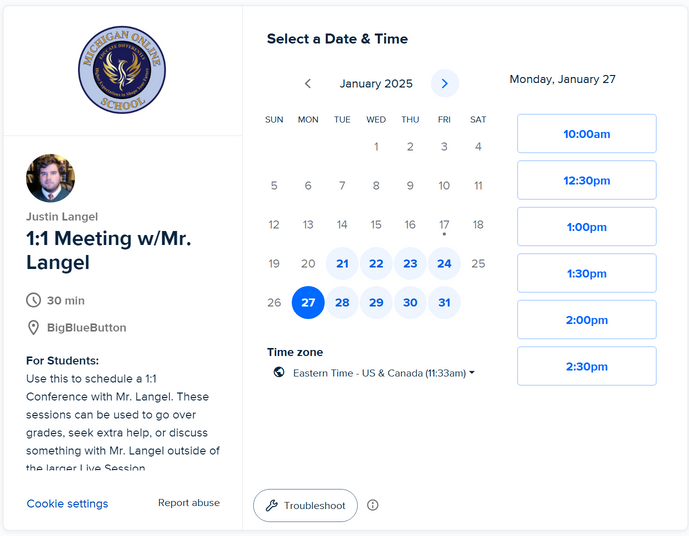
- 1 Find a day that works for you.
- 2 Find a time on the list of appointment times, then click next.
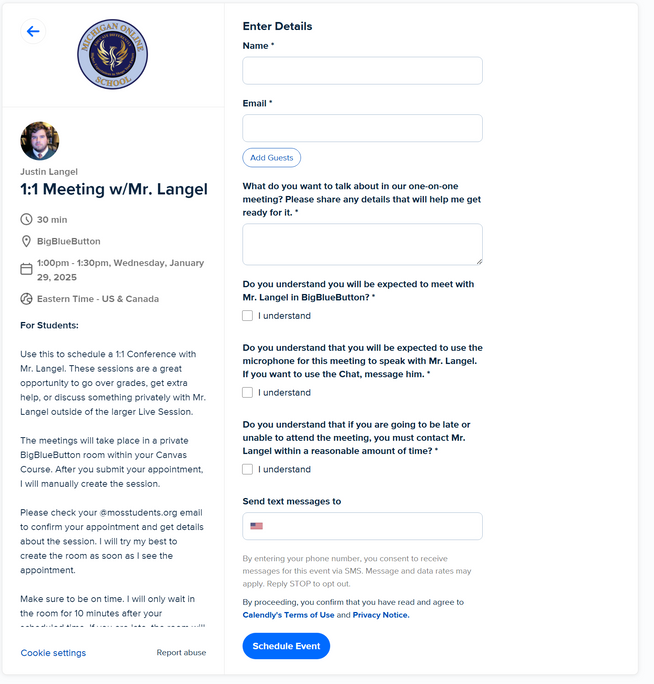
- 3 Confirm the time slot selection.
- 4 Put your name, school email, and the purpose of the 1:1 meeting.
- 5 Read all the "agreement" information.
- 6 Put your cellphone number in so you get texted reminders.
- 7 Make sure everything is correct and click "schedule event".
- 8 Now that you have read the instructions, click the button below to begin!
Important Notice
Please read ALL the steps before making an appointment!
Step 1: Select a Date
Step 2: Fill Details

Ready to schedule? Click the button on the left!